
Do you want your contact center to deliver faster, smarter customer support?
Intelligent routing in Twilio Flex can make it happen! If you’ve struggled with balancing workloads, reducing customer wait times, or getting the right agent on the proper case, intelligent routing could be the game-changer your operation needs.
This post cuts through the jargon with expert explanations, clear steps, and battle-tested best practices, perfect for Twilio Flex users, contact center managers, and software developers ready to scale up.
You’ll learn:
- What intelligent routing means in 2025 (and why it matters),
- Which basics and prerequisites should I check off before starting?
- How to set up intelligent routing—from configuration to advanced customizations,
- Best practices that keep your system running like clockwork,
- Troubleshooting common headaches, and
- Answers to the questions everyone asks.
Grab a fresh coffee and get ready to maximize your contact center’s efficiency!
What we have cover!
- 1 Intelligent Routing in Twilio Flex (2025): What’s New?
- 2 Understanding the Basics of Twilio Flex
- 3 Prerequisites for Setting Up Intelligent Routing
- 4 Step-by-Step Guide to Configuring Intelligent Routing
- 5 Advanced Configurations and Customizations
- 6 Best Practices for Maintaining Your Intelligent Routing Setup
- 7 Troubleshooting Common Issues
- 8 Frequently Asked Questions (FAQs)
- 9 Supercharge Your Contact Center with Intelligent Routing
Intelligent Routing in Twilio Flex (2025): What’s New?
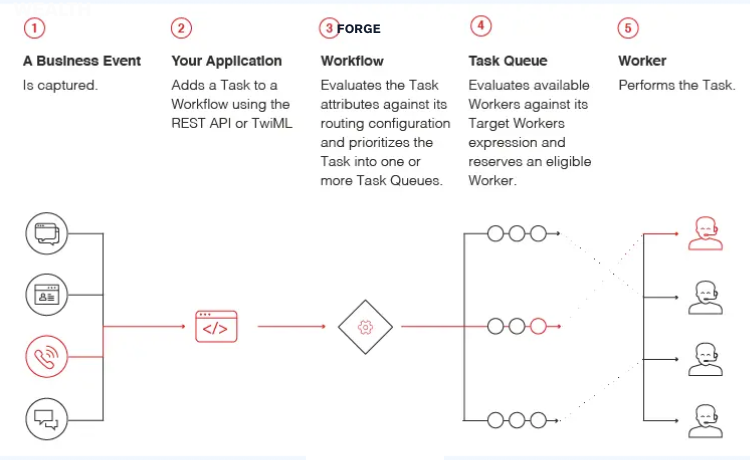
Gone are the days of clunky queuing systems! Intelligent routing ensures every customer gets connected to the right agent at precisely the right time, based on skills, availability, priority, and more.
Why does it matter?
- Customers get answers faster.
- Agents focus on what they do best.
- Managers see improved KPIs across the board.
And with Twilio Flex’s open architecture, you’re not locked into rigid workflows. You can leverage AI and machine learning, custom attributes, and third-party integrations, building routing rules fit for today’s nimble, digital-first businesses.
Want proof? Companies that have deployed intelligent routing in Twilio Flex have reported up to a 40% boost in first-contact resolution rates and sharper agent productivity [Twilio Customer Stories].
Understanding the Basics of Twilio Flex
Before jumping into configs, grounding ourselves in what Flex is and how its routing engine ticks is worthwhile.
Twilio Flex is a customizable cloud contact center platform that gives you complete control over workflows. Its routing system is built atop Twilio TaskRouter, which assigns agents tasks (calls, chats, SMS, etc.).
Key concepts you’ll use a lot:
- TaskRouter: The engine for distributing tasks to the right workers (agents).
- Workers: Your support team members, each defined with skills and attributes.
- Queues: Buckets for grouping tasks waiting for routing.
- Workflows: The set of rules controlling how and where tasks flow.
- Attributes: Metadata about tasks (e.g., customer type, language, channel) and workers.
With Flex, you’re not just “hoping” the next agent handles the next customer well. You’re using logic and data every single time.
Prerequisites for Setting Up Intelligent Routing
A quick checklist before you get started (skip this, and setup gets messy fast!):
- Twilio Account with Flex enabled: Ensure your Flex instance is live and you have admin access.
- Familiarity with TaskRouter: Optional but powerful. Skim the TaskRouter docs.
- List of Agent Skills & Attributes: Plan what distinguishes your agents (e.g., language, tier, department, specialty).
- Task Attributes Defined: Are you routing based on language, priority, or product? Define these up front.
- Business Rules: Know your goals! Do VIPs need routing first? Should sales calls reach certified reps?
- Basic understanding of API or Twilio CLI for programmatic configuration (advanced, but opens more control).
- Integration Needs: Will you connect to CRMs, chatbots, or ticketing systems? Know what data needs to flow.
Tip: Make a worksheet before you touch settings! A little prep here saves big headaches later.
Step-by-Step Guide to Configuring Intelligent Routing
All set? Here’s a stepwise method to get intelligent routing up and humming.
Step 1: Define Required Agent Skills and Queues
List every key skill, department, and role you want to filter by. For example:
- English, Spanish, French
- Sales, Support, Billing
- Tier 1, Tier 2, Tier 3
Go to your Twilio Console → Flex → TaskRouter → Workspaces → Workers to assign these skills as JSON attributes:
“`
{
“languages”: [“English”, “Spanish”],
“department”: “Support”,
“tier”: 2
}
“`
Repeat for every agent.
Step 2: Create and Configure Task Queues
From Console, head to TaskQueues. Create new queues that make sense for your routing logic.
- E.g., “Spanish Sales”, “Tier 1 Support”, “VIP Service”
For each queue, set up a worker expression like:
“`
Languages HAS ‘Spanish’ AND department == ‘Sales’
“`
Step 3: Establish Task Attributes
Every customer request (call, chat, SMS) hitting your Flex instance should be tagged with attributes.
- From your IVR, gather the language or category
- From web chat, capture customer status, product, etc.
Example task attribute JSON:
“`
{
“language”: “Spanish”,
“priority”: “VIP”,
“department”: “Sales”
}
“`
Step 4: Build & Edit Flex Workflows
Workflows control how tasks are matched to the right queues. They allow conditional logic like “If VIP, route here, else there.”
Navigate to TaskRouter > Workflows.
Add routing steps, such as:
- If priority == “VIP”, route to “VIP Service” queue.
- Else route based on language/department.
Workflows can be built visually in Console or scripted via the TaskRouter API.
Step 5: Test Routing Behavior
Always test new workflows! Use the Twilio Console to simulate tasks or create inbound calls/chats with varied attributes. Watch which agents pick up the tasks, and adjust logic or skills as needed.
Quick tip: Create a few fake “test” queues to sandbox changes before going live.
Advanced Configurations and Customizations
There’s a lot you can do beyond basic routing! Here’s how to kick it up a notch:
Integrate AI and Machine Learning
With Twilio’s programmable nature, you can connect Flex with machine learning models. For instance:
- Predict intent (sales, support, complaint) from text
- Auto-assign sentiment-based priorities
- Route high-complexity requests to agents with more experience
Twilio Studio, Functions, or third-party services (like Google Dialogflow or AWS Lambda) work well here. Read this Flex AI Integrations guide for details.
Real-Time Data Enrichment
Hook into your CRM (like Salesforce or HubSpot) to enrich task attributes when a request comes in. Use Flex plugins or Twilio Functions for seamless integrations.
Custom Dashboards and Reporting
Twilio Flex Insights lets you create real-time dashboards, tracking routing efficiency, wait times, SLA adherence, and more. Tailor these dashboards so you catch bottlenecks and agents see performance feedback.
Best Practices for Maintaining Your Intelligent Routing Setup
An excellent system today can break tomorrow if it’s not maintained and optimized! Stay sharp with these habits:
- Regularly review skill assignments as agents gain new expertise.
- Analyze performance data weekly or monthly. Look for spikes in wait times and adjust routing as needed.
- Solicit agent feedback to catch on-the-ground workflow hiccups.
- Audit routing logic after every new product launch, policy change, or major update.
- Stay updated with Twilio improvements, as new features and APIs are released regularly.
Pro tip: Schedule “routing maintenance” reviews at regular intervals. A few hours every quarter will keep your contact center humming!
Troubleshooting Common Issues
Even seasoned teams hit snags. Here’s how to solve the most frequent Flex routing problems:
Tasks Not Being Assigned
- Check that worker expressions in queues match existing agent skills.
- Make sure agents are marked as Available.
“Sticky” Routing or Circular Logic
- Avoid overloading skills/queues with overlapping logic.
- Check for missing attributes or misconfigured workflows if a task isn’t routed.
Unexpected Delays
- Analyze traffic patterns to catch peaks.
- Use Flex Insights to examine queue depths and agent response times.
Integration Failures
- Double-check API endpoints and permissions.
- Monitor logs for hints or error codes when integrating external CRM or AI services.
If you’re stumped, Twilio’s Support Docs and the Twilio Community Forum are filled with answers from experts.
Frequently Asked Questions (FAQs)
What if I want to route based on customer sentiment?
Use a pre-process stage (Twilio Functions or AI integration) to analyze messages, then tag the task attribute and route accordingly.
Can I automate agent skill updates?
Yes! Use the TaskRouter API or Flex plugins to sync skills with HR tools or training platforms.
Do I need coding experience for the setup?
You can handle basic routing via the Console, but API and plugin work unlock deeper customizations.
How scalable is Twilio Flex with intelligent routing?
Extremely! Flex is built for cloud-scale, supporting teams from 10 to 10,000+ agents with dynamic workload balancing.
Is there support if I get stuck?
Absolutely. Rely on Twilio Docs, the developer community, and Twilio support.
Supercharge Your Contact Center with Intelligent Routing
Skilled agents are wasted on generic queues, and customers lose patience with poor matches. Twilio Flex’s intelligent routing closes that gap, ensuring every request lands with the best-suited agent the first time.
Invest time up front, test thoroughly, and keep refining your setup. Soon, your routing will hum smoothly, your agents will be happier, and your customers will notice the difference!
Want more resources or custom code samples? Check out Twilio’s Developer Blog or contact Twilio-certified partners for expert implementation.